Model Routing Powered by Wisdom of the Market
OpenRouter ·

The beauty in markets is the pattern of large, diverse groups of independent individuals collectively making better judgments and decisions than any single expert. OpenRouter sees trillions of tokens every day, and we’ve been working on a new way to share the collective wisdom of these millions of people making model decisions.
Today we’re launching a major update to our Auto router (openrouter/auto) that’s informed by the over 55T in weekly token spend on OpenRouter. We’ve found that model selection driven by market spend outperforms the choices of our old Auto router across a wide spectrum of tasks and cost levels. By referencing the past 7 days of OpenRouter usage, it always stays up to date with new model releases.
We’ve been testing this approach in beta with thousands of people over the past few weeks and today we deployed it for everyone using the Auto router. Try it now by sending "model": "openrouter/auto" to any of our inference endpoints, or read the docs for details.
To power this router, we transformed the task classifications we run on a representative sampling of prompts into a pareto-optimal routing curve. This is the same underlying data that’s shown on our model rankings by task spend. You can specify your desired cost level by sending a cost_tier parameter and it will respect any guardrails/privacy settings from your account when selecting a model.
We used benchmarks across domains to verify the new Auto router’s performance
We designed the router for versatility, so we evaluated it against a deliberately diverse set of benchmarks: MMLU Pro (Knowledge), τ³-bench Banking (Agents), WideSearch (Search), DSQA (Research), and SWE-Atlas QnA (Coding).
To be confident in the new router’s selections at the default cost level, we needed to see it achieve the same level of performance as the old router while reducing costs. We saw this in most domains, with a few exceptions where the old Auto router was underperforming modern budget models. At the max cost level, our bar was frontier performance even if it ended up costing more than the old router.
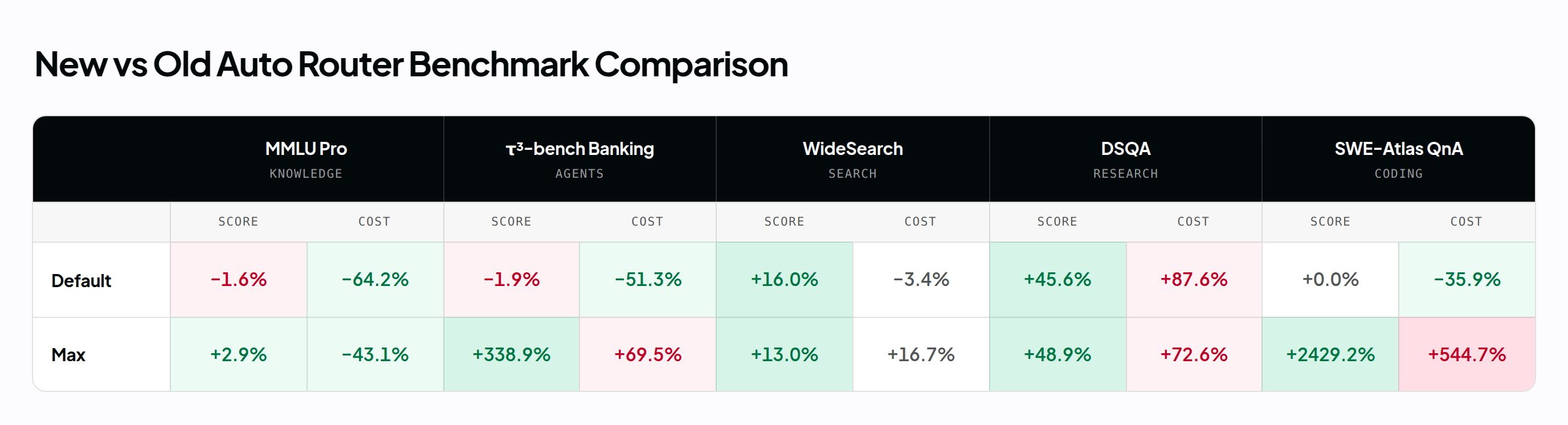
Default on the new router is cost_tier=low and cost_quality_tradeoff=7 on the old router. Max compares cost_tier=max to cost_quality_tradeoff=0.
| Benchmark | New Default | Old Default | New Max | Old Max |
|---|---|---|---|---|
| MMLU Pro (Knowledge) | 85.2% ±0.3 | 86.6% ±0.1 | 91.4% ±0.3 | 88.8% ±0.3 |
| τ³-bench Banking (Agents) | 20.6% ±1.0 | 21.0% ±1.0 | 31.6% ±1.6 | 7.2% ±2.7 |
| WideSearch (Search) | 61.6% ±2.6 | 53.1% ±2.6 | 61.9% ±2.4 | 54.8% ±2.6 |
| DSQA (Research) | 62.9% ±1.6 | 43.2% ±1.7 | 63.0% ±1.6 | 42.3% ±1.7 |
| SWE-Atlas QnA (Coding) | 30.4% ±2.0 | 30.4% ±2.3 | 60.7% ±1.7 | 2.4% ±0.0 |
These results capture a moment in time and will shift as community preferences change over time. We’re using benchmarking to understand relative performance between routing strategies to build confidence that the wisdom of the crowd truly is getting you improved results. Our hypothesis is that efficient model selection will improve with time as more people adopt OpenRouter.
Cost comparison
The new router’s default cost tier will be cost-efficient across a range of workloads, while max allows a broader range of high-cost models for when performance matters more than spend.
| Benchmark | New Default | Old Default | New Max | Old Max |
|---|---|---|---|---|
| MMLU Pro (Knowledge) | $140.93 | $393.34 | $255.71 | $449.61 |
| τ³-bench Banking (Agents) | $155.89 | $320.04 | $168.41 | $99.36 |
| WideSearch (Search) | $30.75 | $31.83 | $36.89 | $31.60 |
| DSQA (Research) | $276.00 | $147.11 | $248.83 | $144.18 |
| SWE-Atlas QnA (Coding) | $297.23 | $463.73 | $1,325.08 | $205.52 |
Any routing strategy that switches between multiple models will incur some increased costs when input cache is rebuilt. Often this cost is worthwhile in order to move to a model better suited to a new task, but can be wasteful if the model switches too frequently. The Auto router implements “sticky” behaviors to keep multi-turn conversations on one model until the model being used is no longer a leading choice for your task.
How the new Auto router works
The new Auto router makes decisions based on what the people using OpenRouter, in aggregate, are using for exactly the kind of task your prompt represents. Think of it like a market index that always stays up to date and gets more efficient the more people use OpenRouter.
The model mixture below shows how the new Auto router’s routing curve maps each task type to the cost_tier settings: low, medium, high, xhigh, and max. It is a point-in-time view: the routing curve shifts as new models launch and the OpenRouter community’s usage patterns change.
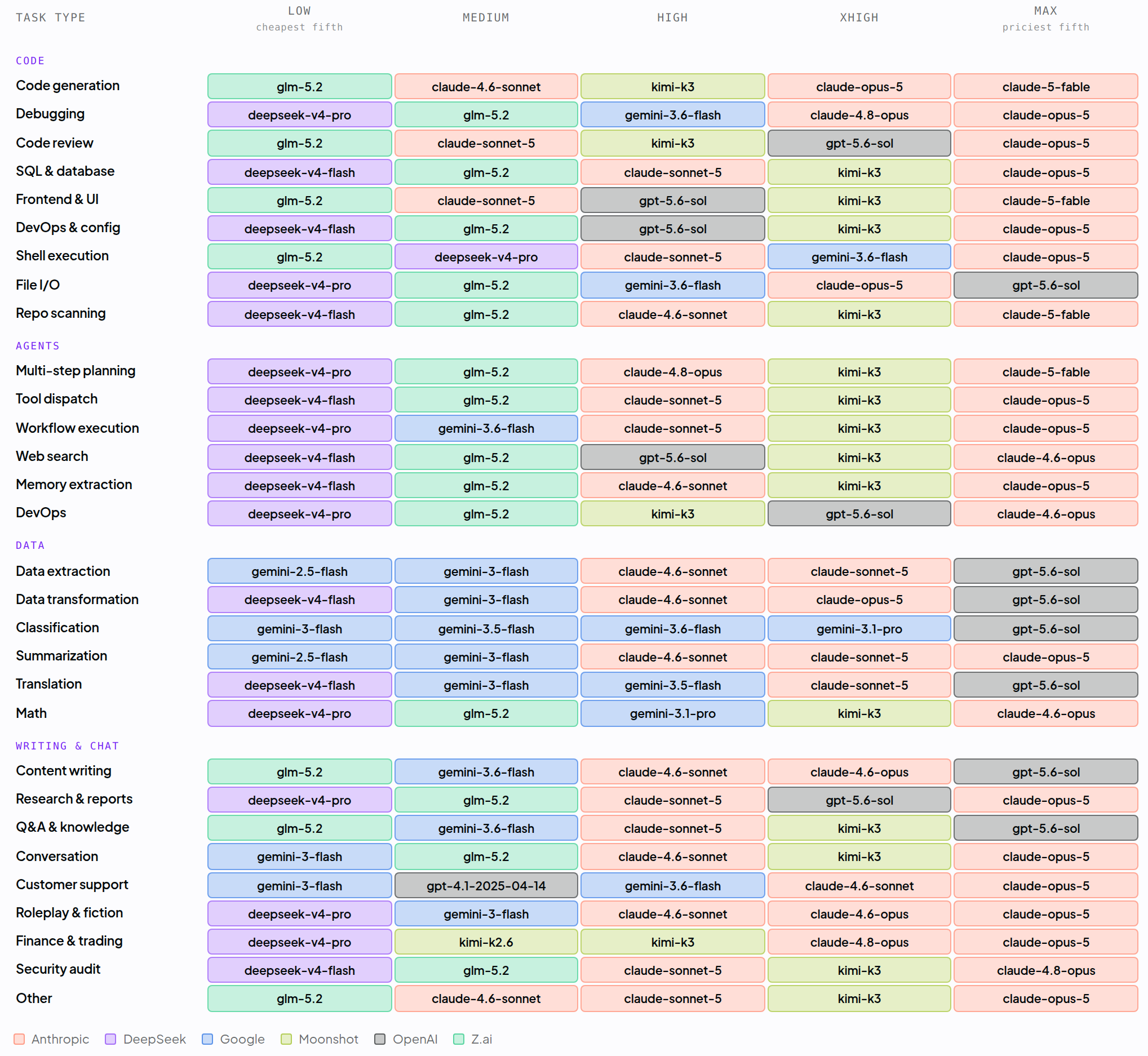 This snapshot is current as of August 10. See the rankings page for the latest.
The rankings it uses are computed from aggregate anonymized spend statistics, protecting the privacy and data policies of all of our customers. Your prompts are classified in-flight without requiring retention. Here’s how it works:
-
Classify the task. A fast, lightweight classifier assigns each prompt one of ~30 fine-grained task types, such as code debugging, multi-step agent planning, knowledge Q&A, math, customer support, or research reports.
-
Rank by real-world spend share. For that task type, the new Auto router looks up which models the OpenRouter community actually spends on over the past 7 days, similar to the “Share of Spend” view from our rankings page. This is a live signal: when people migrate a workload to a new model, the router follows within days.
-
Apply your cost tier. The
cost_tiersetting (low, medium, high, xhigh, or max) sets how much you’re willing to spend and selects the matching cost band of candidates. At low, routing stays with the cheapest capable models for each task; at max, it picks from the most capable, priciest models. -
Route with fallbacks. The selected models become the primary pick plus fallbacks, ordered by their share of usage. Routing respects the model and provider restrictions on your request and account, like allowed models, guardrails, and ZDR policies. If classification or rankings are ever unavailable, the router falls back to a default model set, so a request never fails because of a routing problem.
Across turns, the router remembers the model a conversation landed on and prefers it on later turns. It identifies a conversation from an explicit session_id when provided, or from a fingerprint of the messages otherwise. Candidates are still ranked from scratch each turn, and the remembered model is reused only while it remains among the top candidates, so a better-suited model can take over when the task changes.
Try the new Auto router now
The Auto router works wherever you’d normally put a model string:
{
  "model": "openrouter/auto",
  "messages": [
    { "role": "user", "content": "Explain quantum entanglement in simple terms" }
  ]
}
Or set your cost tier and restrict the candidate set:
{
  "model": "openrouter/auto",
  "messages": [{ "role": "user", "content": "..." }],
  "plugins": [{
    "id": "auto-router",
    "cost_tier": "max",
    "allowed_models": ["anthropic/*", "openai/*"]
  }]
}
The cost_tier parameter accepts low, medium, high, xhigh, or max, and sets how much you’re willing to spend: low routes to the cheapest capable models, max always picks from the most capable ones. The old Auto router exposes a numeric cost_quality_tradeoff setting where 0 is the high-quality setting and higher values are more cost-sensitive, defaulting to 7. The cost_quality_tradeoff parameter is still accepted for backwards compatibility and keeps its original cost-ceiling behavior, and it takes precedence if you send both.
The response’s model field tells you which model was selected, and there’s no additional fee; you pay the standard rate for whichever model runs. See the new Auto router docs for details, including session stickiness for multi-turn conversations.
Use openrouter/auto-beta to be the first to get new improvements
We’ll continue improving this router to optimize model selection and cache performance over time. Anyone who wants to try the newest routing behaviors first can use openrouter/auto-beta, where those changes land before they reach openrouter/auto. The new router has been running here for a couple of weeks, with thousands of people using it for real workloads. Tell us what you see in our Discord or through your account representative.